
P1, P2, P3 and P4 Ticket Priority Levels: Definitions, Examples and SLA Targets
What P1 to P4 mean for support tickets, how to choose a level using impact and urgency, response targets that make a sensible starting point, and how to keep P1 rare.
Suhep Team · · 8 min read
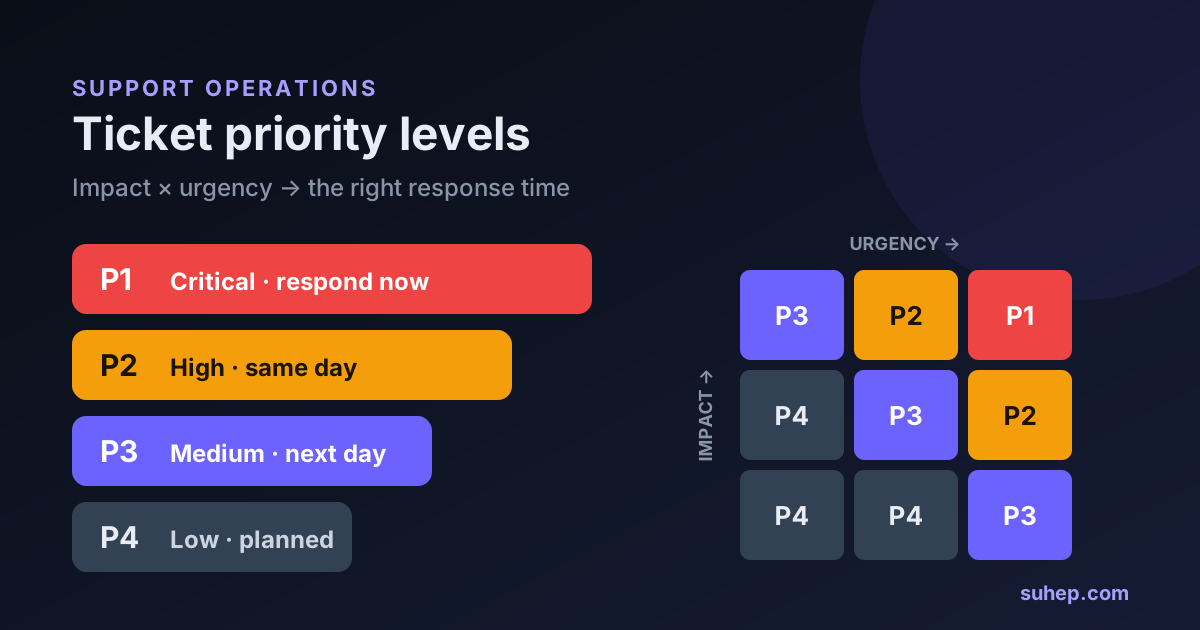
P1, P2, P3 and P4 are the shorthand most support and IT teams use for how quickly a ticket needs attention. P1 is the most urgent and P4 can wait. The labels are the easy part. The hard part is agreeing on what puts a ticket into each level, and then setting response times your team can actually keep on a Tuesday afternoon and at 2 a.m. on a Sunday.
This guide gives you working definitions, a simple way to decide the level, example SLA targets to start from, and the habits that quietly turn every ticket into a P1.
Quick answer
- P1 (critical): the product or a core service is down or unsafe for many customers, data or security is at risk, and there is no workaround.
- P2 (high): a major feature is broken or a group of customers is blocked, and there is no reasonable workaround.
- P3 (medium): something is not working as expected for one customer or a small group, but a workaround exists or the impact is limited.
- P4 (low): how-to questions, cosmetic problems, small bugs with no business impact and feature requests.
Priority is normally set by combining two things: impact, meaning how much damage the problem does, and urgency, meaning how quickly it gets worse. Each level then gets a first-response target and a resolution or update target.
Where P1 to P4 comes from
The idea comes from IT service management. In ITIL-style incident management, a ticket's priority is set by assessing its impact and urgency, as the IT Process Wiki's incident priority checklist summarises: urgency measures how quickly a resolution is needed, and impact measures the extent of the problem and the damage it could cause before it is fixed.
You will also see severity levels such as SEV-1 and SEV-2, mostly in engineering and incident response. Severity describes how bad a technical problem is. Atlassian, for example, defines a SEV 1 as a critical incident with very high impact, such as a customer-facing service being down for all customers. Priority describes the order in which the support queue works on tickets. A customer support team usually needs only one scale. If your engineers already use SEV levels, write down how they map, for example SEV-1 to P1, so nobody has to translate during an outage.
The four levels, with support examples
P1: critical
A P1 stops customers from using the product, or puts money, data or security at risk, for many people at once, with no workaround. Typical examples:
- checkout or payments failing for all customers;
- nobody can log in;
- a customer reports seeing another account's data;
- the service or a hosted site is down for everyone after an infrastructure failure.
A P1 needs one named owner, an immediate acknowledgment, regular status updates and, where the problem affects many customers, a shared public update rather than dozens of individual replies.
P2: high
A P2 blocks important work for a group of customers or for one customer in a way that costs them real money, and there is no reasonable workaround. Examples: one payment method failing in one country, an integration that has stopped syncing for several accounts, notification emails not being sent, or a single business customer's storefront going offline.
P3: medium
A P3 is a real problem with limited impact or a workable workaround. A report shows the wrong figures for one user but the data can be exported, a widget renders badly in one browser, or an invoice needs correcting before the next billing date.
P4: low
P4 covers questions and requests rather than failures: how do I do this, can you add that, there is a typo on this page. These tickets still deserve a good answer. They just do not need to interrupt anyone.
How to decide: impact multiplied by urgency
Ask two short sets of questions about every new ticket.
Impact:
- How many customers are affected: one, a group or everyone?
- Does it stop customers from paying, selling or serving their own customers?
- Is personal data, account security or legal compliance involved?
- Is there a workaround the customer can use today?
Urgency:
- Is the problem getting worse, spreading or about to hit a deadline?
- Is there a contractual commitment, launch or billing date attached?
- Will waiting a day change the outcome for the customer?
Rate each as high, medium or low, then read the level off a simple grid:
- High impact and high urgency → P1
- High impact and medium urgency, or medium impact and high urgency → P2
- High impact and low urgency, medium impact and medium urgency, or low impact and high urgency → P3
- Medium impact and low urgency, or low impact and medium or low urgency → P4
When an agent cannot decide between two levels, pick the higher one and review it later. PagerDuty's public incident response guide gives the same advice for severity: if you are unsure, treat it as the higher level and discuss it afterwards rather than in the middle of the problem.
Example SLA targets to start from
There is no universal standard for P1 to P4 response times, and copying a large company's numbers is a good way to breach your own SLA in week one. The targets below are a starting template for a small team that offers business-hours support with an out-of-hours route for emergencies. Adjust them to the people you actually have.
- P1: first human response within 1 hour, at any time of day if you promise round-the-clock cover; status updates every hour until service is restored or a workaround is in place.
- P2: first response within 4 business hours; updates at least twice per business day.
- P3: first response within 1 business day; resolution target of 3 to 5 business days.
- P4: first response within 2 business days; no fixed resolution date for feature requests, but tell the customer how requests are reviewed.
Three details matter as much as the numbers. First, decide whether each clock runs only during business hours or around the clock, and publish your business hours. Second, decide whether the clock pauses while you are waiting for the customer to reply. Third, define resolution for a P1 as restoring service, including a temporary workaround, and track the permanent fix separately so the target stays honest.
An automatic acknowledgment is not a first response. If the customer receives a reply that only says the ticket was received, the clock should keep running until a person or a verified answer actually addresses the problem.
Writing definitions your team will agree on
- Use examples from your own product, not abstract words like significant or severe.
- Let any agent raise a P1, and have a lead confirm it within minutes.
- Treat the priority a customer selects on a form as useful input, not the final level. Most people pick urgent.
- Re-prioritise when the facts change, and record the reason in the ticket.
- Review the share of P1 and P2 tickets every month. If P1 keeps growing, your definitions are probably too loose.
Mistakes that make priority levels useless
- Prioritising by tone. The angriest message is not always the biggest problem. Score impact and urgency first, then handle the frustration with a fast, human reply.
- Using customer value as the level. A large account with a how-to question is still a P4. Handle important accounts with a separate SLA policy or as a tie-breaker within a level.
- Promising what you cannot staff. A one-hour P1 target at night only works if someone is on call and receives the alert.
- Never downgrading. Once a workaround is in place, a P1 often becomes a P3. Lowering it frees the team for the next real emergency.
- Adding levels nobody uses. P0 and P5 sound thorough, but every extra level is another argument during triage.
How to tell whether your priorities are working
- SLA compliance by priority: the share of tickets in each level that met the first-response target.
- Breaches and near misses, grouped by reason, such as the wrong level, no owner or out-of-hours gaps.
- The share of tickets in each level, month by month.
- How often tickets are re-prioritised, and in which direction.
- Reopen rates for P1 and P2 tickets after they are marked solved.
If compliance is high but customers still complain, the targets are probably too generous. If compliance is low for one level only, look at ownership and staffing for that level before changing the target. Our page on customer support SLA management covers how SLA tracking and escalation fit together.
Where AI fits in priority setting
AI is useful at the front of the queue. It can suggest a topic and a likely priority, ask for the missing details an agent would need, such as an order number or the exact error message, and answer P4 how-to questions directly from your knowledge base. It should not have the final say on P1 and P2 tickets, refunds, security or account access. Those need a person, and the handover should carry the full conversation. Our AI-to-human handoff checklist explains how to set that up.
Setting this up in Suhep
Suhep tickets use four priority levels, Urgent, High, Medium and Low, which map directly to P1, P2, P3 and P4. In SLA settings you set a first-response and a resolution target for each level, choose whether the clock runs during business hours only or 24/7, and set a warning threshold so tickets close to a breach are flagged before the target is missed. The dashboard lists tickets that are at risk. Read the help article on ticket priorities and SLA, see how ticket categories and routing send each ticket to the right person, or compare plans and pricing.
Frequently asked questions
What is a P1 ticket?
A P1 ticket is the highest priority level. It usually means the product or a core service is down or unsafe for many customers, money, data or security is at risk, and there is no workaround. It needs an immediate response and one named owner.
What is the difference between priority and severity?
Severity describes how bad a technical problem is, and is common in engineering and incident response. Priority describes the order in which the support team works on tickets. Many teams map them directly, for example SEV-1 to P1.
What is a typical response time for P1, P2, P3 and P4?
There is no universal standard. A practical starting point for a small team is 1 hour for P1, 4 business hours for P2, 1 business day for P3 and 2 business days for P4, adjusted to the cover you can actually staff.
Should customers choose their own ticket priority?
Let them indicate urgency, because it is useful information, but have an agent or a clear rule set the final level. Customers naturally rate their own problem as urgent, which would make every ticket a P1.