
Spam Tickets in Your Helpdesk: How to Stop Them Without Losing Real Customers
Where spam tickets come from, why you should classify before you notify, and how to quarantine junk without losing a real customer's request.
Suhep Team · · 8 min read
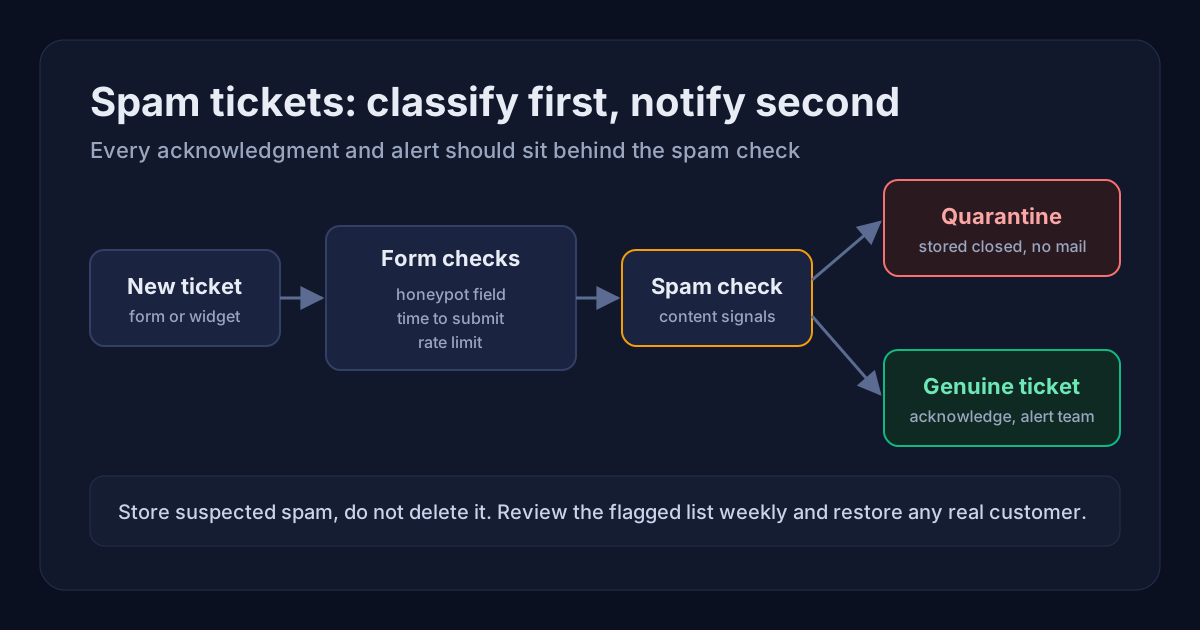
Spam tickets are support requests that no real customer sent. They come from bots posting to your contact form or chat widget, junk email turned into tickets, and link drops dressed up as questions. A few a week are an annoyance. A few dozen a day bury real customers, distort your reports and, if your helpdesk replies automatically, turn your support address into a source of unwanted mail aimed at strangers.
This guide covers where spam tickets come from, the order in which to filter them, and how to quarantine junk without losing a real customer.
Quick answer
- Stop bots at the form with invisible checks: a hidden honeypot field, a minimum time to submit and rate limits per network.
- Classify every new ticket before anything is sent. Acknowledgments, team alerts and AI replies should run only after a ticket passes your spam checks.
- Do not delete what you catch. Store suspected spam closed and flagged, so a real request can be recovered.
- Review the flagged tickets on a schedule, and adjust the rule whenever you find a real customer among them.
Where spam tickets come from
- Web forms and chat widgets. Scripts find a public form and post to it, often without loading the page at all. For most small teams this is the largest source, because every submission creates a ticket.
- Email to ticket. Anything sent to your support address can become a ticket. Helpdesks filter this channel with their own spam checks. Zendesk, for example, sets doubtful messages aside as suspended tickets for review and deletes them automatically after 14 days if nobody acts.
- Abuse aimed at someone else. Some bots are not trying to reach you. They type a stranger's email address into your form so that your automatic reply lands in that person's inbox.
The third route deserves attention. OWASP's catalogue of automated threats lists content spam as OAT-017 Spamming, but it deliberately leaves out the mass abuse of form-to-email functions that send messages to unintended recipients, treating it as an implementation flaw rather than a bot problem. Put plainly, if your form will send mail to any address a stranger types in, that is a design issue in your own system, and blocking bots alone will not fully fix it.
Why the order of operations matters more than the filter
Most advice stops at "add a CAPTCHA". The bigger risk is what happens in the second after a ticket is created. A typical helpdesk creates the ticket, emails the customer a confirmation, alerts the team by email or chat, and may run an automated reply. If the spam check runs after those steps, or not at all, every bot submission produces outgoing mail.
- Backscatter. The acknowledgment goes to whatever address the bot entered, usually a real person who never contacted you. To them, you are the spammer, and they may report your message.
- Sender reputation. Support mail often shares a domain with invoices and password resets. Google's email sender guidelines ask senders to keep the spam rate reported in Postmaster Tools below 0.3%. A complaint from a stranger counts the same as one from a customer.
- Alert fatigue. When the new-ticket alert fires for junk all day, people mute it, and the next urgent ticket arrives in a muted channel.
The rule is simple: classify first, notify second. RFC 3834, the standard for automatic email responses, states that an automatic responder must not blindly send a response for every message received, and names avoiding replies to spam and avoiding being used to amplify abusive messages among the reasons. A ticket acknowledgment is an automatic response, so the same logic applies. The same document says automatic responses should not be sent to messages carrying an Auto-Submitted header with any value other than "no", which is worth checking if you turn email into tickets.
What a spam wave on our own contact form taught us
The Suhep contact form was targeted by a bot this autumn. Submissions arrived with long, randomly capitalised names, messages that were nothing but a string of digits, and a company website field that was not a website. The email addresses were real and belonged to people with no connection to us. Within a week the volume grew from about one a day to around fifteen a day.
Anyone could see the tickets were junk. The damage was that each one had already sent a new-ticket email to our inbox and an acknowledgment to an innocent address before anyone looked. Closing the tickets afterwards could not recall the mail that had already gone out.
The fix had two parts. Bot checks moved in front of ticket creation, and every notification moved behind the spam check. Suspected spam is now stored closed with the reasons recorded, and nothing is sent for it. Real requests kept flowing as before, because none of the checks ask a genuine visitor to do anything extra.
Layer 1: stop bots at the form
- Honeypot field. Add a field that people cannot see and should leave empty. Many simple bots fill in every field they find. Hide it with CSS rather than relying on a hidden input type, and give it a label that tells assistive technology to leave it blank.
- Minimum time to submit. Record when the form was opened, and treat submissions that arrive faster than a person could type as automated. A couple of seconds catches scripted posts. Do not set it so high that someone pasting a short message is blocked.
- Rate limits per network. Cap how many tickets one address can create per hour and per day. If your forms post through a server-side proxy, every request may appear to come from the same address. Key the limit on the forwarded client address, or per site, otherwise one bot can lock out every customer behind that proxy.
- A challenge only when needed. If invisible checks are not enough, add a challenge. Cloudflare Turnstile, for example, runs non-interactive checks in the browser and usually avoids showing visitors a puzzle. Visible puzzles cost you genuine submissions, especially on mobile, so keep them as a second step.
- Checks on the server. Bots post straight to your endpoint, so every rule must run on the server. A check that exists only in the page's JavaScript is easy to skip.
Layer 2: classify every ticket before anything is sent
Some spam gets past form checks, so score each new ticket on content signals as well. Useful signals include:
- A message with no words, such as only digits or a single link.
- A name that looks generated, for example a long run of letters with random capitals.
- Fields that should hold a domain or a phone number but do not.
- The same text arriving from many addresses in a short time.
- Phrases and link patterns that keep appearing in the spam you have already caught.
Treat a combination of signals as spam, not a single one. Real customers sometimes paste an order number as the first line or type their name in capitals, so requiring two or more signals keeps false positives low.
Only tickets that pass go on to acknowledgment, team alerts, routing and automated replies. Map out every action your helpdesk takes when a ticket is created, including integrations and chat notifications, and confirm that each one sits behind the check.
Layer 3: quarantine, do not delete
- Store flagged tickets closed, with a tag and the reasons they were flagged. That gives you an audit trail and a way to recover mistakes.
- Keep them out of the working queue, SLA clocks and response-time reports. Our guide to calculating SLA compliance explains why excluded tickets should be counted and shown, not silently dropped.
- Give the bot a normal-looking response for submissions you discard. Telling a script exactly why it failed helps whoever runs it adjust.
- Cap how many flagged tickets you store per hour, so a flood cannot fill your database.
- Delete on a retention schedule, not on sight.
Layer 4: review and adjust
Set aside ten minutes a week to scan the flagged tickets. If you find a real customer, restore the ticket, reply personally, and loosen the rule that caught them. Track three numbers over time: flagged tickets per day, real tickets per day, and false positives found. A sudden jump in flagged volume usually means a new bot campaign. A sudden drop in real tickets can mean your filters have become too strict.
After every change, test the form yourself as a normal visitor: on a phone, with a slow first attempt, and with browser autofill switched on. Make sure autofill does not populate the hidden field, because that would turn a real customer into a false positive.
Mistakes that make spam worse
- Sending acknowledgments or alerts before the spam check.
- Deleting suspected spam immediately, so mistakes cannot be recovered.
- Using one shared rate limit for every site behind the same proxy.
- Letting spam count in support metrics, which makes response times and volumes meaningless.
How Suhep handles spam tickets
The Suhep contact form and the chat widget's ticket form both include a hidden honeypot field and a minimum time-to-submit check, and public ticket creation is rate limited per network. Submissions that trip those checks are discarded quietly. New tickets are also scored on content signals. Suspected spam is stored closed with the reasons noted, and no acknowledgment or team notification is sent for it. The limit on tickets per site counts only genuine tickets, so a bot cannot use up the allowance your real customers need.
Once a ticket is through, it is routed like any other. The help articles on ticket categories and routing and ticket email notifications explain what happens next, and plans are listed on the pricing page.
Frequently asked questions
Will a honeypot field block real customers?
Rarely, as long as it is hidden properly and labelled so assistive technology leaves it blank. The main risk is browser autofill filling the hidden field, so test your form with autofill switched on.
Should I put a CAPTCHA on my support form?
Start with invisible checks such as a honeypot, a minimum time to submit and rate limits. Add a challenge only if spam still gets through, and prefer one that does not show most visitors a puzzle.
Is it safe to auto-close spam tickets?
Yes, if they are stored closed and flagged rather than deleted, no mail is sent for them, and someone reviews the flagged list regularly so real requests can be restored.
Why are people complaining about our support auto-replies?
Bots may be submitting your form with other people's email addresses, so your acknowledgment reaches someone who never contacted you. Run the spam check before any acknowledgment is sent.