
SMS Ticket Notifications: When to Text Customers About Their Support Requests
When SMS ticket updates help, how to collect consent per ticket, what each text should say, and the limits that keep costs and complaints under control.
Suhep Team · · 8 min read
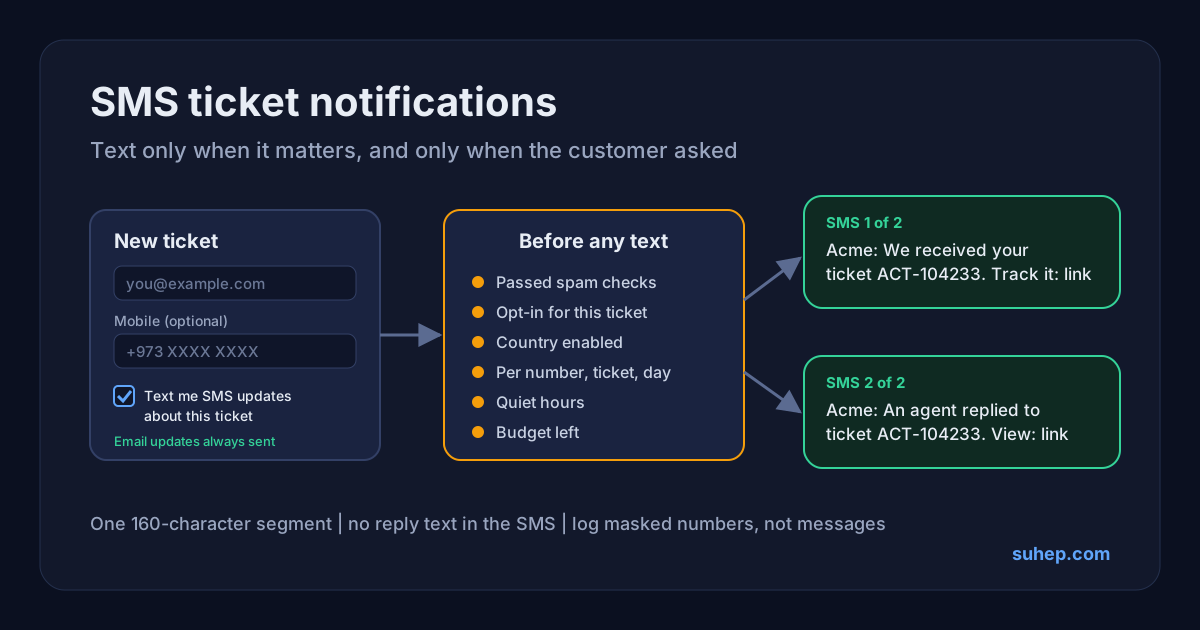
Email is still where most helpdesks send ticket updates: it is cheap, it carries the full reply and it leaves a record. But it only helps if the customer sees it. When someone reports a problem from their phone and walks away, a reply can sit unread in a promotions folder while your SLA clock says the job is done. A short text is much harder to miss.
Used badly, though, SMS becomes noise, a compliance risk and a bill nobody watches. This guide covers when SMS ticket notifications are worth sending, how to collect consent, what each text should say, and the guardrails we used when we added SMS updates to the Suhep ticket form.
Quick answer
- Make SMS optional and ask for it per ticket: a mobile number field plus a separate, unticked opt-in box. Keep email as the main channel.
- Text only for moments that matter to the customer: the ticket was received, and a person has replied. Never text internal notes or every status change.
- Keep each message inside one 160-character segment, and send a link to the conversation instead of the reply itself.
- Put limits around everything: per number, per ticket, per day, quiet hours and a hard budget stop.
- Run the SMS step only after your spam checks, and log metadata rather than message text.
When SMS helps, and when it does not
SMS earns its place when the customer is likely to be away from their inbox and the update changes what they do next. Good examples:
- Confirmation that a request arrived. The customer filled in a form on their phone and wants to know it did not vanish.
- A person has replied. The answer is waiting and the customer needs to read it or respond.
- Time-sensitive service news, such as an outage being fixed or an appointment needing a decision today.
It does not help when it repeats what email already does well. Avoid texting the full reply, surveys, newsletters or every status change. Each of those trains people to ignore your sender name.
Ask for consent per ticket, not once forever
The simplest and safest design is to ask at the moment the customer opens a ticket. Add an optional mobile field and, below it, a checkbox that is unticked by default, with plain wording such as "Text me SMS updates about this ticket. Email updates are always sent." Store when and where the consent was given, and tie it to that ticket only.
This matters for more than good manners. In the United States, the FCC's rules require a caller to have the consumer's consent before sending autodialed texts to a wireless number. The UAE regulator, TDRA, takes strict action against marketing SMS sent without prior consent. India's TRAI rules go further: any business sending bulk messages, including transactional and service messages, must register as a principal entity, register its sender header and its content templates, and register consent templates where they apply. None of this is legal advice, and the rules in your markets may differ, but a per-ticket, explicit opt-in puts you on the right side of all of them.
One lesson from building this ourselves: keep the SMS number separate from any other phone field. If your helpdesk already uses a phone number for something else, such as a WhatsApp automation, give the SMS number its own field, or a customer who only wanted texts can end up in a channel they never chose. And a number collected for ticket updates is not permission to send offers.
Choose the events that trigger a text
Write down every event in your helpdesk and decide, one by one, whether it deserves a text. Ours looks like this:
- Ticket received: yes, once, with the ticket reference.
- Public reply from an agent: yes, with a minimum gap between reply texts on the same ticket.
- Internal note: never. The customer cannot see it, so a text about it is confusing at best.
- Automated or AI reply in a live chat: no. The customer is usually still on the page.
- Ticket closed, survey sent, follow-up reminders: email only.
Write messages that fit in one segment
A single SMS carries 140 bytes. With the standard GSM-7 character set, which uses 7 bits per character, that is 160 characters. As soon as a message contains a character outside that set, phones switch to UCS-2, which uses 16 bits per character, so the same 140 bytes hold only 70 characters. Longer messages are split into segments, and providers usually bill per segment. Some symbols, such as curly brackets, need an escape character and count as two.
In practice this means one stray emoji, curly quotation mark or long dash pasted into a template can quietly double the cost of every message. Normalise templates to plain characters and count the length after the variables are filled in.
A structure that works:
- The brand name the customer recognises.
- What happened, in a few words.
- The ticket reference.
- A link to see the details.
For example: "Acme: We received your ticket ACT-104233. We will reply by email. Track it: https://acme.example/t/k7Rq2mXw9P". Leave out the content of the reply, account details, prices and anything you would not print on a postcard. The text tells the customer something is waiting; the link shows it.
Make the link safe to tap
The FCC advises people not to tap links in texts from numbers they do not recognise, which is sensible advice your own messages have to overcome. Help customers by sending from a consistent sender name and keeping the link short and clearly connected to your brand.
The page behind the link deserves the same care:
- Use a long, random code rather than the ticket number, so links cannot be guessed.
- Show only the public conversation between the customer and your team. Internal notes must never appear.
- Mark the page noindex and keep analytics and advertising scripts off it.
- Let the link expire after a sensible period, and send people to the normal support route once it has.
Sender names and country rules
Most businesses want their name, rather than a number, to appear as the sender. These alphanumeric sender IDs are convenient, but they are usually one-way, so customers cannot reply to them. Say where to reply in the message or on the linked page.
Several countries require sender IDs to be registered first. For the UAE, AWS's registration guide asks for company registration documents and, where the link between the company and the sender ID is not obvious, proof of rights to the brand. India's DLT system requires header and template registration before traffic is delivered. In some countries carriers may also replace an unregistered sender name with a generic one.
So switch countries on one at a time, keep a country off until its registration is done, and fall back to email there. A text from an unknown number looks more like a scam than a service update.
Guardrails: limits, quiet hours and budget
SMS costs real money per message, and a bug or a flood of tickets can spend it fast. Set limits before the first live send:
- A maximum number of texts per phone number per day, and a minimum gap between them.
- A maximum per ticket, and a minimum gap between reply notifications on the same ticket.
- A daily cap per site or brand, and a daily spending cap.
- Quiet hours for the region you serve. Skip customer texts overnight and let the email carry the update.
- A hard stop below your monthly budget, with an alert to a person when spending passes a warning level.
- Fail closed: if the system cannot read your remaining credit for a while, stop live sending rather than guess.
Log metadata, not message text
You will need to answer "why did this customer not get a text?" Each attempt should log the time, message type, ticket, a masked number, country, status, skip reason and cost, but not the message text or the full number. Skipped messages are as useful as sent ones: a run of "quiet hours" or "country not enabled" entries explains exactly why someone heard nothing.
Test without spending money
Build a dry-run mode that runs every check and writes a log entry but never calls the provider, and use it to test opt-in, limits, quiet hours and the budget stop. Many SMS APIs reject a request with missing fields, which confirms credentials and the endpoint without sending anything. Then send one real test to a number in each enabled country.
Finally, make sure spam cannot trigger texts. The SMS step should run only after a ticket has passed your spam checks; our guide to stopping spam tickets explains why every outbound action belongs behind that check.
How Suhep handles SMS ticket updates
The ticket form in the Suhep chat widget has an optional mobile field and a separate, unticked box: "Text me SMS updates about this ticket". Email updates are always sent, so SMS is an extra, never a replacement. The help article on ticket email notifications covers the email side, and embedding the widget shows how the form gets onto your site.
When a customer opts in, Suhep sends at most two kinds of text: one when the ticket is received, and one when an agent posts a public reply. Internal notes and automated chat replies do not trigger a text. Each message carries the site's own name, the ticket reference and a short link to a branded, noindex page that shows only the public conversation and expires after 60 days.
Sending runs only for tickets that pass the spam checks. It is switched on per site and per country, with limits per number, per ticket and per day, quiet hours overnight and a monthly budget stop. The log keeps masked numbers and delivery status, never the message text. Plans are listed on the pricing page.
Frequently asked questions
Should SMS replace email for ticket updates?
No. Email carries the full conversation and a record of it. Use SMS as an optional nudge that something is waiting, with a link to the details.
How long should a support SMS be?
Aim for one segment: 160 characters with the standard GSM-7 character set, or 70 if the message contains characters outside it, such as emoji. Include the brand, what happened, the ticket reference and a link.
Can customers reply to a support text?
Not when you send from an alphanumeric sender name, which is usually one-way. Tell customers where to reply, for example by email or on the linked ticket page.