
Support Macro Audit Checklist for Small Teams
How to audit macros and canned responses before they drift: owners, stale links, risky promises, escalation paths, AI reuse and a tracker you can copy.
By Suhep Team · · 9 min read
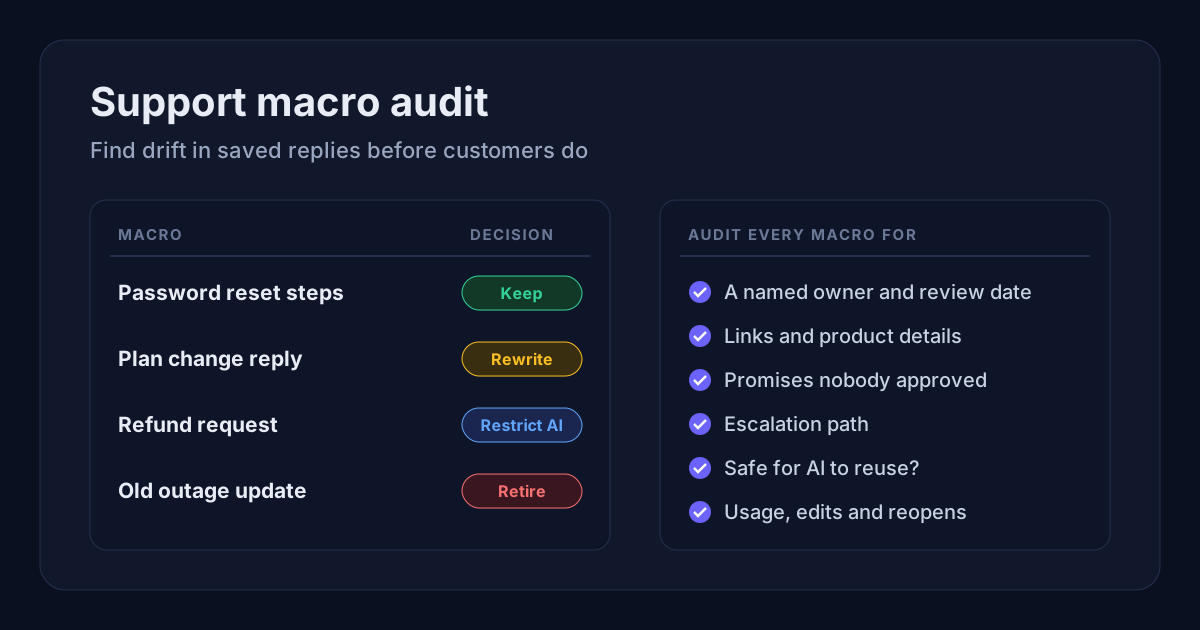
Macros and canned responses exist to save time: one click inserts a tested reply, sets a field or adds a tag. Zendesk describes a macro as "a prepared response or action that an agent can manually apply" to a ticket, and Freshdesk's canned responses work the same way for replies. The trouble is that a saved reply does not know when the business around it changes.
A reply that was right six months ago may now link to a retired help article, name a plan you no longer sell, promise a refund nobody approved or skip an escalation the team added after an incident. Nobody notices, because the text still looks professional. That slow gap between what the macro says and what is true is macro drift.
This checklist shows a small support team how to audit its saved replies in an afternoon, decide what to keep, rewrite, restrict or retire, and keep the library from drifting again.
The short answer
A support macro audit checks every saved reply for an owner and review date, working links, current product and policy details, promises the team cannot guarantee, the right escalation path, tone, whether AI may reuse it, and how it actually performs on tickets. Start with the macros that are used most and the ones that touch money, access or customer data, then put a review date on every macro so the audit becomes routine.
Why macros drift
Macros drift because the business changes faster than the support library. The usual triggers:
- prices, plan names or plan limits change
- refund, cancellation or billing rules change
- the product interface changes, so setup steps no longer match the screens
- help-centre articles are renamed, merged or deleted
- an integration or partner changes its process
- legal or privacy wording is updated
- the team adds a new escalation rule after an incident
Agents usually discover drift only when a customer replies, confused, to a macro that was wrong. The audit is there to catch it before the next send.
AI makes this more urgent. If an assistant drafts answers from your saved replies or help content, one stale paragraph is no longer sent a few times a week; it can shape every answer on that topic.
1. Build an inventory
Export or list every macro and canned response, including the personal ones. Zendesk's API, for example, returns both shared and personal macros, and admins see the personal macros of every agent. Freshdesk lets a response be visible only to its creator, to all agents or to selected groups. Personal replies are where old wording hides, so include them.
Record for each one:
- name and folder or category
- owner (a named person, not "support")
- last updated and last reviewed date
- the ticket type it is used for
- linked help articles or pages
- what it changes besides the text, such as status, tags, priority or assignee
- whether AI may reuse it
A macro without an owner gets an owner or gets retired. Shared content that nobody owns is exactly the content that drifts.
2. Sort by risk and volume
Not every macro needs the same depth of review. Put these in the high-risk group:
- refunds, credits and billing disputes
- cancellations and account closure
- account access, login and ownership questions
- security reports and data or privacy requests
- outages and incident updates
- anything with legal, medical or financial wording
- complaints and escalations
Low-risk macros are things like a simple acknowledgment, a greeting or a request for a screenshot. Audit high-risk and high-volume macros first. If your helpdesk reports usage, use it: Zendesk can show how often each macro was used in the past hour, day, week and month on its Professional and Growth plans and above.
3. Check every link and product detail
Most drift sits in the details a macro points to. For each macro, check that:
- every link returns a live page, not a redirect to the help-centre home
- the linked article still matches the product and its screenshots
- plan names, limits and prices match the current pricing page
- the setup steps match the current screens
- the macro does not link to a draft or internal-only page
Treat the macro and the article as one unit. Intercom, for instance, lets teams insert help articles straight into macros, and customers can react to those articles in the Messenger. If an article gets poor reactions, review the macros that send it as well.
4. Remove promises the team cannot keep
Macros should never promise outcomes that depend on someone else or that need approval. Watch for lines like:
- "This will be fixed today."
- "You will receive a full refund."
- "Your account will be approved."
- "This is fully compliant."
- "No data can ever be lost."
Replace them with wording that is true every time it is sent:
- "We are looking into this now and will update you here."
- "We will review your refund request against our policy and confirm the outcome."
- "Approval depends on the platform's review; here is what we can check on our side."
- "A member of the team will look at this before anything changes on your account."
5. Check the escalation path and the ticket fields
Some macros should never close a ticket on their own. If a ticket mentions payments, legal threats, privacy, security, a major outage, harassment or a regulator, the macro should hand it to the right person with an internal note, not just answer and close.
Also check what the macro does besides inserting text. Zendesk's own documentation warns that what one macro does can be undone by another macro, and that macros with placeholders need care on linked problem and incident tickets, where it is easy to fill in the wrong values. A macro that sets the status to solved, lowers the priority or reassigns the ticket deserves the same scrutiny as its wording. Make sure the status it sets is honest; our guide to helpdesk ticket statuses explains when pending or on hold is the right choice, and the P1–P4 priority levels help you check that a macro never quietly downgrades an urgent ticket.
6. Review tone and personalisation
Macros should sound consistent without sounding robotic. Check that:
- the greeting is natural and there is room to add the customer's context
- placeholders such as the customer's name and ticket number fill in correctly
- apologies are not overused, and blame or defensive wording is gone
- serious cases do not get cheerful wording
- the reply does not sound more certain than the facts allow
Small teams often reuse replies a founder wrote in the early days. They can be good, but they were written for one voice and a smaller product. Read them out loud and check they still fit.
7. Decide what AI may reuse
If an AI assistant drafts replies from your saved replies or your knowledge base, label each macro as allowed, restricted or blocked for AI reuse.
Allowed: low-risk, recently reviewed macros that link to current help articles, contain no customer-specific facts and include clear escalation triggers.
Restricted or blocked: billing, refunds, cancellations, account access, security, privacy, legal and complaint macros, and any reply that depends on account-specific facts. For these, AI can summarise the ticket and suggest the macro, but a person should choose and send it. Our AI-to-human handoff checklist covers which topics should always reach a person.
8. Test macros against real tickets
A macro can look perfect in a spreadsheet and still fail in conversation. For each high-volume macro, open five to ten recent tickets where it was used and ask:
- Did it answer the question the customer actually asked?
- Did the agent have to edit it heavily before sending?
- Did the customer reply confused or ask the same question again?
- Was the ticket reopened or escalated afterwards?
Heavy editing is the clearest signal. If agents rewrite a macro every time, it is not saving time; it is a draft nobody has fixed.
9. Make one decision per macro
End the audit with one of four decisions for every macro:
- Keep: accurate, owned and performing. Set the next review date.
- Rewrite: useful but outdated. Fix it, note what changed and tell the agents who use it.
- Restrict: accurate but risky. Limit it to a group or block it from AI reuse.
- Retire: duplicated, unused or wrong. Deactivate it rather than deleting it, so you keep a record. Zendesk, for example, marks macros active or inactive.
10. Set a review rhythm and keep version notes
A sensible starting cadence:
- high-risk and high-volume macros: monthly
- setup and how-to macros: after every product release that changes the screens
- billing and plan macros: after every pricing or plan change
- policy macros: after every policy change
- low-risk acknowledgments: quarterly
When a macro changes, record what changed, who changed it, why, and whether AI may still reuse it. A one-line changelog in the tracker is enough. It lets you see which version a customer received and stops someone from restoring wording that was removed for a reason.
A worked example
Picture a five-person support team with 60 macros. Twelve have no owner, and seven link to articles that were renamed in a help-centre clean-up. Two billing replies still name a discontinued plan, and one refund macro says "you will receive a full refund within 5 days" even though refunds now need approval. The team retires nine duplicates, rewrites the billing and refund replies with approval wording, restricts four account-access macros from AI reuse and gives every remaining macro an owner and a review date. A first audit like this fits into an afternoon; the monthly review afterwards is much shorter, because only the high-risk group needs a full read.
Macro audit tracker (copy this)
Create one row per macro with these columns:
- Macro: name and folder
- Owner: the person who keeps it accurate
- Risk: high, medium or low
- Last reviewed: date of the last full check
- Links: current, broken or outdated
- Promise risk: refund, deadline, approval, compliance or none
- Escalation: the person or team it hands off to
- Fields changed: status, priority, tags or assignee
- AI reuse: allowed, restricted or blocked
- Signals: usage, heavy edits, reopens, complaints
- Decision: keep, rewrite, restrict or retire
- Next review: date
How Suhep fits in
Suhep is a helpdesk for small support teams, with live chat, tickets and an AI assistant that answers from your knowledge base. Its automation rules are deliberately narrow: they can change a ticket's priority, category and assignee, rules can be previewed before they run, and every run is recorded in the organisation's audit history. Keeping automated changes that narrow is one way to stop a stale rule doing damage at scale, and the audit above applies to the saved replies and help articles in any helpdesk you use.
Sources
- Zendesk: Using macros to update tickets
- Zendesk Developer Docs: Macros API
- Freshdesk: Creating canned responses
- Intercom: Share articles to answer questions faster
Frequently asked questions
What is support macro drift?
Macro drift is the gap that opens when saved replies stay the same while the product, prices, policies, links or escalation rules change. The macro still looks correct, but it now gives customers outdated or risky information.
How often should support macros be audited?
Review high-risk and high-volume macros monthly, setup macros after product releases, billing macros after pricing changes and low-risk acknowledgments quarterly. Run a full audit at least once a year.
Should we delete old macros?
Usually deactivate them instead. A deactivated macro stops being offered to agents but keeps a record of what customers were told, which helps when a past reply is questioned.
Can AI reuse support macros?
Low-risk, recently reviewed macros with clear escalation triggers are usually fine. Billing, refund, account access, security, privacy and legal macros should be chosen and sent by a person.
What is the first thing to fix in a macro audit?
Give every macro an owner and fix the high-risk replies first: refunds, billing, cancellations, account access and security. They cause the most damage when they drift.