
Helpdesk Ticket Statuses Explained: Open, Pending, On Hold, Resolved and Closed
What each helpdesk ticket status should mean, how pending differs from on hold and resolved from closed, and a one-page status policy your team can copy.
Suhep Team · · 8 min read
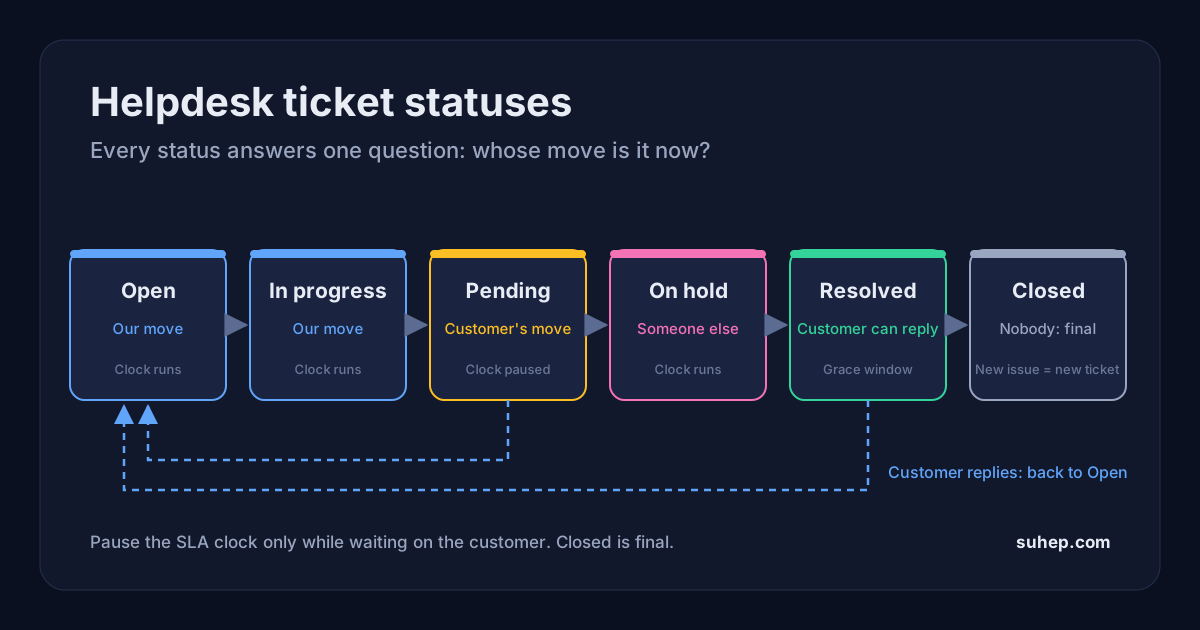
A ticket status looks like a small label, but it is the thing your whole team reads first. It decides which queue a ticket sits in, whether an SLA clock is running, what the customer is told and, later, whether your reports mean anything. When statuses are vague, tickets go quiet in "pending" for weeks, customers get told their issue is solved when nobody checked, and the numbers on your dashboard drift away from reality.
This guide explains what the common helpdesk ticket statuses should mean, how to tell pending from on hold and resolved from closed, and how to write a short status policy your team will actually follow. It is written for small and growing support teams, whatever tool you use.
Quick answer
- Every status should answer one question: whose move is it now? Us, the customer, someone else, or nobody.
- Keep the set small. Open, In progress, Pending, On hold (optional), Resolved and Closed cover almost every team.
- Pending means you are waiting on the customer. On hold means you are waiting on someone else, such as a developer or a supplier.
- Resolved means you believe the issue is fixed and the customer can still reply. Closed means the ticket is finished and a new message should start a new ticket.
- Write down an entry rule and an exit rule for each status, and decide in advance which statuses pause your SLA clock.
One question every status must answer
Most status confusion comes from labels that describe a feeling instead of a fact. "Escalated" or "Investigating" say something about the ticket, but not who has to act next. Priority, tags and assignment already cover the rest.
A useful test: if an agent reads only the status, do they know whether they must act today? Keep the status about the next move and severity in the priority field. Our guide to P1 to P4 priority levels covers that side.
The core ticket statuses, defined
Open
The ball is in your court. New tickets land here, and a ticket should return to Open automatically whenever the customer writes back, so a reply never sits unnoticed in a waiting state.
- Enter: a new ticket arrives, or the customer replies to a Pending or Resolved ticket.
- Exit: an agent picks it up, asks the customer a question, or fixes it.
In progress
Someone is actively working on it. It is optional, but it stops two agents answering the same ticket in a shared queue. Small teams with assigned tickets may not need it.
Pending (waiting on the customer)
You have replied and need something from the customer before you can continue: a screenshot, an order number, a test from their side. Zendesk's own help centre describes it well: pending means the ticket is not yet solved, but you are waiting on information from the requester before you can work on it further.
- Enter: only when your last message asks the customer a clear question.
- Exit: the customer replies (back to Open), or a follow-up timer runs out and you send one reminder before resolving.
On hold (waiting on someone else)
You are waiting on a third party: a developer, a finance colleague, a courier, a hosting provider. The customer has nothing to do. Zendesk treats On-hold as an optional, internal status that the requester does not see; on-hold tickets appear as open to the customer. That is a sensible model to copy even if your tool works differently.
- Enter: the next action belongs to someone outside the support team, and you have told the customer what you are waiting for.
- Exit: the third party answers, at which point the ticket goes back to Open or In progress.
Resolved
You believe the issue is fixed and have told the customer how. If the customer replies, the ticket should reopen with its history rather than start from scratch. Zendesk calls this Solved; many tools say Resolved.
Closed
The ticket is finished and locked. In Zendesk, agents cannot set Closed directly: an automation moves solved tickets to closed, and a customer reply to a closed ticket creates a follow-up ticket instead of reopening it. Whether or not your helpdesk enforces that, the principle is worth keeping: Closed is final, and anything new deserves a fresh ticket with its own SLA.
Pending vs on hold: why the difference matters
Both statuses mean "we are waiting", so many teams merge them, and then cannot tell which waiting tickets need a nudge to the customer and which need a nudge to their own engineers.
- Who you chase: pending tickets need a polite reminder to the customer; on-hold tickets need a reminder inside your company or to a supplier.
- What the customer sees: a customer told "we are waiting for you" when they already answered will rightly be annoyed. Only use Pending when the customer truly owes you something.
- How the clock behaves: it is common to pause the SLA clock while waiting on the customer, because you cannot control their reply time. Pausing it while waiting on your own developers is much harder to defend, since that delay is yours.
If you want only one waiting status, make it Pending, use it strictly for customer replies, and track internal waits with an owner and a due date.
Resolved vs closed: give customers a window to reply
The gap between Resolved and Closed is a grace period. It lets the customer say "that did not work" and land back in the same conversation, with all the history intact. Zendesk's default automation closes a ticket four days after it is solved, the setting can be anything from one hour to 28 days, and Zendesk's stated best practice is three to five days. Choose a window that matches how quickly your customers can test a fix.
Decide which statuses pause the SLA clock
Statuses and SLAs are tied together. If Pending pauses the resolution clock, every pending ticket shrinks your measured resolution time, so a team that parks tickets in Pending to look faster will look faster on paper. Some tools make this an explicit setting: Freshdesk, for example, lets admins switch the SLA timer off for statuses such as pending or waiting on a third party.
A rule that holds up well: pause the clock only while waiting on the customer, never while waiting on yourselves, and write that rule down. Then count tickets the same way every month. Our walkthrough on calculating SLA compliance rate shows how paused and excluded tickets change the result.
Statuses are customer-facing words
It is easy to design statuses for the team and forget that customers see them too. In Suhep, for example, a customer can look up a ticket with its ticket ID and email address and see the current status, and when an agent changes the status, Suhep emails the customer a short update that names the new status. That has shaped how we think about status names:
- Use plain words. "Waiting for your reply" or "Resolved" make sense to anyone. Labels like "L2 queue" or "Escalated to dev" belong in tags or assignment, not in the status.
- Change status on purpose. If every status change reaches the customer, flipping a ticket between Open and In progress three times in an hour sends three updates about nothing.
- Say what happens next. When you set Resolved, the reply should say what you changed and how the customer can tell you if it did not work.
You can see how statuses, priorities and assignment fit together in the help article on managing support tickets.
Common status mistakes
- Pending as a parking lot. Tickets go to Pending without a question being asked, so the customer does not know they are expected to reply. Rule: no question, no Pending.
- Resolving without confirming. Marking a ticket resolved because the agent applied a fix, before checking it worked, inflates first-contact resolution and drives reopens.
- Too many custom statuses. Each one is another place for tickets to hide. Add one only when it changes who acts next.
- No exit rules. A status without a time limit becomes a graveyard. Pending and On hold both need a follow-up date.
- Spam and duplicates closed as resolved. They should not count as solved customer problems. Close them with a reason, so they can be excluded from reporting. Our guide to stopping spam tickets covers the first half of that problem.
A one-page status policy you can copy
Share this with the team and review it after a month:
- Every status answers "whose move is it?". Severity lives in priority, not status.
- Open: our move. A customer reply always sends a ticket back to Open.
- Pending: only after we ask the customer a clear question. One reminder after a set number of days, then resolve with a note that they can reply to reopen.
- On hold: waiting on someone outside support. Every on-hold ticket has an owner and a follow-up date, and the customer has been told what we are waiting for.
- Resolved: we explained the fix. The customer has a fixed window to reply before the ticket closes.
- Closed: final. New issues get a new ticket.
- The SLA clock pauses in Pending only. Spam and duplicates are closed with a reason and excluded from SLA reporting.
Reports you can trust
Once each status means one thing, a few simple views become useful: tickets sorted by how long they have sat in Pending or On hold, and the share of resolved tickets that reopen. A rising reopen rate usually means tickets are being resolved before the fix is confirmed.
Frequently asked questions
What is the difference between pending and on hold in a helpdesk?
Pending means you are waiting for the customer to reply, for example with a screenshot or an order number. On hold means you are waiting on someone else, such as a developer, a supplier or another team. The difference tells you who to chase, and many teams pause the SLA clock only for Pending.
What is the difference between a resolved and a closed ticket?
A resolved ticket is believed to be fixed, but the customer can still reply and the ticket reopens with its history. A closed ticket is final; in tools such as Zendesk a reply to a closed ticket creates a new follow-up ticket. Most teams move tickets from resolved to closed automatically after a few days.
How many ticket statuses should a support team have?
Usually five or six: Open, In progress, Pending, an optional On hold, Resolved and Closed. Add a custom status only if it changes who needs to act next. Anything else, such as severity or the team involved, belongs in priority, tags or assignment.