
What Is First Response Time? How Small Support Teams Measure It
What first response time measures, which replies count, business hours vs clock time, average vs median, realistic targets and how small teams lower it.
By Suhep Team · · 8 min read
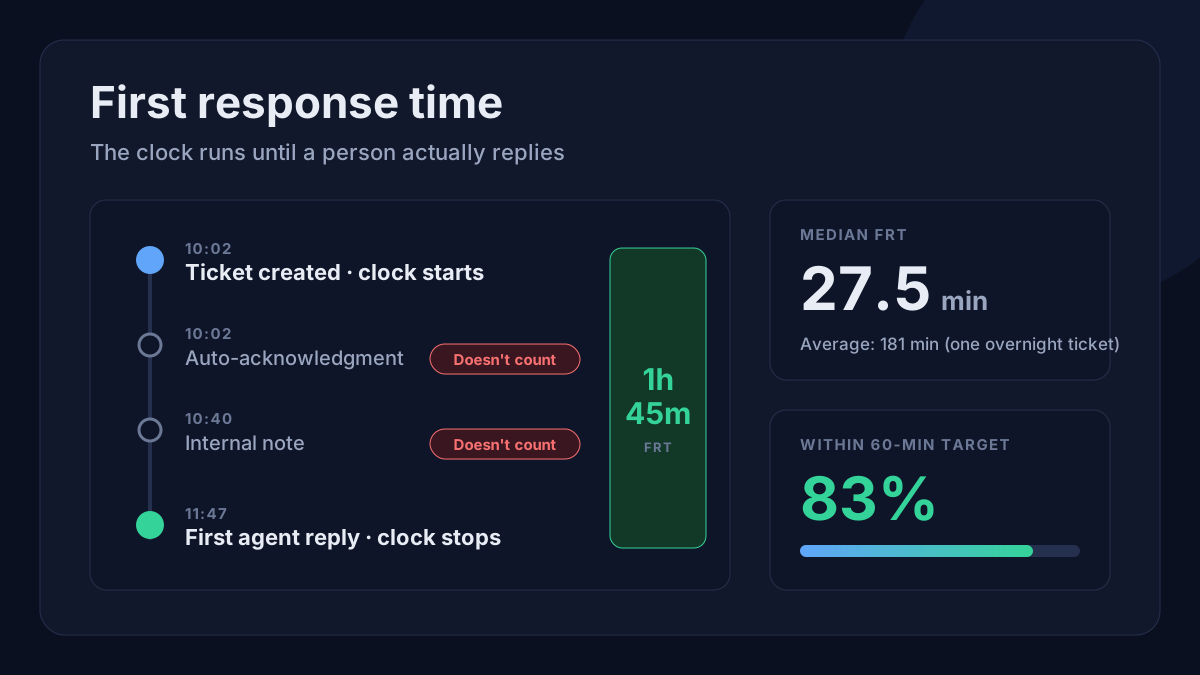
A customer sends a ticket at 10:02. Your first proper reply goes out at 11:47. That gap, one hour and 45 minutes, is the ticket's first response time, and it is the number customers feel most. They do not see your routing rules or your macros. They see how long they waited before a person said something useful.
First response time (FRT) looks like the simplest support metric there is, yet small teams often count the wrong reply, mix business hours with clock hours, or report an average that hides the tickets nobody answered. Here is how to measure it properly and bring it down without gaming it.
The short answer
First response time is the time between a customer creating a ticket and the first public reply from a person on your team. Automatic acknowledgments, internal notes and status changes do not stop the clock. Measure it per ticket, then summarise a period with a median and an average, split by channel and priority, and pair it with the share of tickets answered within your target.
What starts and stops the clock
The clock starts when the ticket is created: the moment the email arrives, the form is submitted or the chat becomes a ticket. It stops at the first public reply written by an agent.
The big helpdesks agree on this. Zendesk's documentation describes first reply time as the time between ticket creation and the first public agent comment, and notes that most automated or bot actions do not count. Help Scout defines first response time as the average time a customer waits for the first reply from your team, and says assigning, status changes, tags and notes do not affect response time.
So these do not stop the clock:
- the auto-reply that says "we've received your request"
- an internal note to a colleague
- changing the status, priority or assignee
- a bot answer, unless your team has deliberately decided to count it (if you do, report it separately so you can still see human response time)
That last point matters more every year. If an AI assistant answers in seconds and you fold that into FRT, the metric can look excellent while customers who needed a person still wait hours. Keep the human first response visible on its own.
Business hours or clock hours?
Decide this before you set a target. Take a team that works 09:00 to 18:00, Monday to Friday. A ticket arrives at 17:50 on Friday and gets its first reply at 09:10 on Monday.
- Clock (calendar) time: 63 hours 20 minutes.
- Business-hours time: 20 minutes (10 minutes on Friday plus 10 on Monday).
Both are true. Business hours show how quickly the team responds while it is working. Calendar time shows what the customer actually experienced. Zendesk stores both versions for every ticket, and Help Scout's email report has an office-hours toggle that recalculates response and resolution times against your company hours. If your tool reports only one, find out which one before you compare weeks or put a promise on your website.
A practical rule for small teams: set your SLA target in business hours (it is what your staffing can control), publish those hours where customers can see them, and look at calendar time once a month to decide whether you need weekend or evening cover.
How to calculate first response time
For one ticket:
FRT = time of first public agent reply − time the ticket was created
For a period, the common version is the average:
Average FRT = total of all first response times ÷ number of tickets that received a first response
Notice the denominator. Freshdesk's Helpdesk Performance report, for example, divides by the number of tickets whose first response was sent in the selected period, and Help Scout counts conversations a user replied to in the period. That is reasonable, but it means a ticket nobody has answered is not in the average at all. A team that quietly leaves its hardest tickets alone can watch its average improve. Always look at the unanswered queue next to the number.
A worked example: why the median matters
Say six tickets came in yesterday, with these first response times in minutes: 12, 18, 25, 30, 41 and 960. The last one arrived after hours and waited overnight.
- Average: 1,086 ÷ 6 = 181 minutes, about three hours.
- Median: halfway between 25 and 30 = 27.5 minutes.
- Within a 60-minute target: 5 of 6 tickets, or 83%.
The average says customers waited three hours. The median says a typical customer waited under half an hour. Neither is wrong, but one outlier drags the average, so it swings from week to week when volume is low. Use the median as your headline, keep the average for trend, and use the percentage within target for your SLA. That percentage is the same idea as the SLA compliance rate, applied to the first-response clock.
What is a good first response time?
There is no universal number, and published benchmarks mix channels, industries and team sizes. A good first response time is one you can meet consistently for each type of request and that matches what you promise publicly.
Set targets by channel and priority rather than one number for everything:
- Live chat: customers expect a reply within minutes, so only offer chat during hours you can actually staff it.
- Email and web form: a few business hours is a common, honest starting point for a small team.
- Urgent issues (an outage, payments failing, a customer locked out): the fastest target you can defend, with an out-of-hours route if you promise one.
- Low-priority requests (feature ideas, general questions): a longer target is fine if you say so.
If you already use priority levels, attach a first-response target to each. Our guide to P1, P2, P3 and P4 ticket priority levels has a starting template you can adapt. Then measure against your own targets, not someone else's averages.
Fast is not the same as helpful
FRT rewards speed, so it is easy to game. The classic trick is a human-written "Thanks, looking into it!" sent within a minute of every ticket. Technically it stops the clock. The customer is no better off.
A first response should do at least one of these:
- answer the question or fix the problem
- ask the one specific question you need answered to move forward
- confirm what happens next and when, for issues that genuinely need investigation
To keep the metric honest, watch resolution time and satisfaction next to it. If FRT falls while resolution time rises or satisfaction drops, the first replies are fast but not useful.
How small teams lower first response time
You rarely need more people first. Most FRT problems in small teams come from how the queue is worked, not from typing speed.
- Work the oldest unanswered ticket first. A view sorted by age and filtered to tickets with no agent reply stops new easy tickets jumping ahead of old hard ones.
- Route on arrival. Send billing, technical and sales questions to the right person automatically, so tickets do not sit in a shared inbox waiting for someone to claim them.
- Cover the gaps you can see. Look at when tickets arrive by hour and weekday. If a third of them land between 18:00 and 21:00, a short evening shift will beat any process change.
- Keep saved replies current. Macros make first replies fast only if they are right, so review them regularly; our support macro audit checklist shows how.
- Use statuses properly. Tickets marked pending or on hold should genuinely be waiting on someone else; see helpdesk ticket statuses explained.
- Answer common questions before they become tickets. A good help centre, and an assistant that answers from it, takes simple questions out of the queue and leaves people more time for the rest.
- Get warned before a breach. An alert at, say, 80% of the target gives someone time to reply instead of finding the miss in next week's report.
A 15-minute weekly FRT review
Once a week, look at:
- median and average first response time, split by channel and priority
- the percentage of tickets answered within target
- the oldest ticket still waiting for a first reply, and why it is waiting
- the three slowest first responses of the week, and what they have in common (time of day, topic, someone on leave)
- whether any first replies were holding messages rather than real answers
How Suhep measures first response time
In Suhep, the dashboard's Avg Response Time card shows the average number of minutes between a ticket being created and the first agent reply on it. Internal notes are excluded, tickets without an agent reply are left out, and the card compares the figure with yesterday's. It is measured in clock time, so read it alongside your business hours. Per-agent response and resolution averages are under Admin → Analytics → Agent Performance; see agent performance tracking.
For targets, each SLA policy in Suhep sets a first-response and a resolution time in hours for a priority level, has a Business Hours Only switch, and offers escalation options such as notifying the assigned agent on a breach, with a warning threshold that defaults to 80% of the target. The dashboard also lists tickets at risk of missing their SLA. The help article on ticket priorities and SLA lists the default targets, and dashboard metrics explained covers the other cards.
Sources
- Zendesk: Understanding ticket reply time
- Freshdesk: Average first response time in Analytics (Helpdesk Performance)
- Help Scout: Reports: Email (metric definitions and office hours)
Frequently asked questions
What is first response time in customer service?
First response time is how long a customer waits between creating a ticket and receiving the first public reply from a person on the support team. Auto-acknowledgments, internal notes and status changes do not count as a response.
How do you calculate average first response time?
Add up the first response times of every ticket that received a first reply in the period and divide by the number of those tickets. Unanswered tickets are not in that calculation, so check the unanswered queue alongside the average.
Should first response time use business hours?
Set and track your SLA target in business hours, because that is what your staffing controls, and publish those hours. Review calendar-time figures monthly to see what customers actually experience and whether you need extra cover.
Does an automatic reply count as a first response?
No. An automatic acknowledgment tells the customer the request arrived, but it does not help them. Most helpdesks, including Zendesk, leave automated and most bot actions out of first reply time.