
Introducing Suhep: How the Helpdesk Works, What It Costs and Where the AI Stops
How Suhep answers from your help articles, when it hands a ticket to a person, what each plan includes, and the limits we set on purpose.
By Suhep Team · · 6 min read
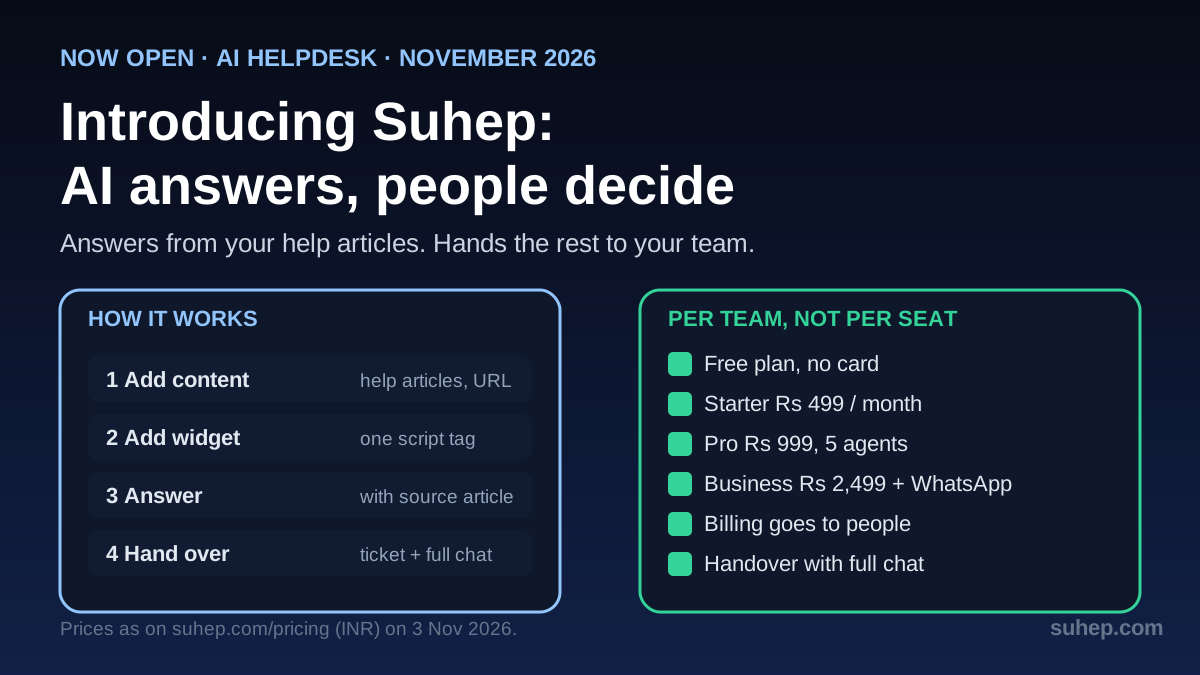
Suhep is a helpdesk with AI built in, and it is open to every team. It answers common customer questions from your own help articles and shows which article it used. Anything it is unsure about, or that should never be settled by software, goes to your team as a ticket with the whole conversation attached.
We built it at Hostao® because our own support had two problems. Most of the day went on questions our help articles already answered. And when a chat did need a person, the customer often had to explain everything again. The support chat on hostao.com runs on Suhep every day, so we use what we describe here.
This post covers how Suhep works, where the AI deliberately stops, what each plan includes (prices checked against the pricing page on 4 November 2026) and who it is not for.
How Suhep works
1. Add your content. Write help articles in the built-in help centre, or paste your website address into the home page preview. Suhep builds its answers from that content and nothing else.
2. Add the chat widget. Copy one script tag from the Widget Builder into your site. Live chat is included from the Starter plan; the Free plan covers email tickets.
3. Answer or hand over. When a question is covered by your articles, Suhep answers right away and links the source article, so the customer and your team can check it. When it is not sure, or the request is sensitive, it opens a ticket instead of guessing.
That last step matters most. If your help articles are thin, the AI will hand over more often, and that is by design. Our guide to writing help articles that AI agents can use shows how to close those gaps.
Where the AI stops
Some requests should always reach a person. In Suhep, billing, account, sensitive and uncertain requests go to your team as a ticket, with the conversation, the customer and the reason it was passed on attached. A message such as "I want a refund for last month" lands with your team. The AI does not try to settle it.
Three limits are set on purpose:
- It answers only from your content. No article that covers the question means no confident answer.
- Refunds, account changes and anything sensitive are always handed over, whatever the article says.
- A person stays in charge of what the customer receives when the AI only drafts a reply.
For a practical review of your own handoff rules, use the AI-to-human handoff checklist.
One inbox, with SLAs and reports
Email, live chat and widget tickets land in one shared inbox with assignment and status. You set response targets, and routing rules send work to the right people. For example: when a new ticket mentions "refund", route it to Billing. Urgent tickets can be flagged before they are late, not after a customer complains.
Per the pricing page, routing rules start on Pro, and Business adds automation rules with SLA alerts and escalation, plus a reports and CSAT dashboard. If you are setting targets for the first time, read how to calculate an SLA compliance rate and the SLA management overview. Teams moving from a shared mailbox can start with turning a shared inbox into tickets.
Who it is for
Suhep is built for small teams that answer a lot of customers:
- Online stores: answer delivery, returns and payment questions from your policies, while refunds and order changes go to a person.
- SaaS and apps: turn your docs into instant setup answers, and send bugs and account issues to your team as tickets.
- Hosting companies and agencies: run a help centre on your own domain (Pro and above) and keep client conversations in one inbox.
- Service businesses: capture website enquiries as tickets so nothing gets lost in email.
If spam is already clogging your queue, fix that before you add AI: how to stop spam tickets covers it.
What it costs
Suhep is priced per team, not per seat, so adding a colleague does not raise the bill each time. Prices below are the INR prices on the pricing page, which can also show USD, EUR and GBP. Paying yearly saves 20%, and checkout is handled by Razorpay.
- Free, forever: 1 agent, 50 AI responses and 100 tickets a month, 50 articles, email. No credit card.
- Starter, Rs 499 a month: 2 agents, 200 AI responses and 500 tickets a month, 100 articles, email and live chat.
- Pro, Rs 999 a month: 5 agents, 500 AI responses a month plus bring-your-own API key, unlimited tickets and articles, basic routing rules, Slack notifications and webhooks, a custom domain, branding removed, priority support and a guided WhatsApp setup review.
- Business, Rs 2,499 a month: 15 agents, 2,000 AI responses a month plus bring-your-own key, WhatsApp and Instagram that you connect yourself with your own number and account, reports and a CSAT dashboard, automation rules with SLA alerts and escalation, white-label controls, plus guided reviews for API access and SSO.
- Enterprise, custom: unlimited agents, custom AI volume, dedicated infrastructure options and a custom SLA review. Contact the team for a quote.
On Business you connect your own WhatsApp Business number through Meta's Cloud API, and Meta's own conversation fees, if any, are billed by Meta. API access and SSO are set up with our team through a guided review rather than switched on instantly.
Who it is not for
Be honest with yourself before you sign up. Suhep is probably not the right tool if you need a large contact-centre suite with phone and voice, if you want an AI that answers from the open web instead of your own articles, or if you have no help content and no time to write any. The free plan exists so you can test the answers against your own questions before paying anything.
Privacy and data
A data processing agreement is available, which matters if you handle EU customers' data: Article 28 of the GDPR requires a contract like this between a business and the services that process personal data for it. Suhep's pages state that connections use TLS 1.2 or newer in transit, and privacy requests go to privacy@suhep.com.
Try it without signing up
Two free tools need no account:
- On the home page, paste your website address to preview how Suhep would answer from your own content.
- The AI reply generator drafts a calm reply to one tricky customer message for email, live chat, WhatsApp or social media, using only the facts you give it.
Getting started
- Create a free account and add five to ten help articles for your most common questions.
- Test a handful of real customer questions and see which are answered and which become tickets.
- Set one response target and one routing rule, then widen them once the team is comfortable.
- Upgrade only when you need more agents, live chat, a custom domain or more channels.
Want new features early? Join the Suhep beta. Questions go to support@suhep.com.
Sources
- Suhep pricing (checked 4 November 2026)
- Regulation (EU) 2016/679, Article 28: Processor
Frequently asked questions
What does Suhep do?
Suhep is a helpdesk with AI built in. It answers common customer questions from your own help articles, shows the article it used, and hands anything uncertain or sensitive to your team as a ticket with the full conversation attached.
Is Suhep free to start?
Yes. The Free plan needs no credit card and includes 1 agent, 50 AI responses and 100 tickets a month, 50 help articles and email support. Paid plans start at Rs 499 a month.
When does the AI hand a conversation to a person?
Billing, account, sensitive and uncertain requests go to your team as a ticket. A refund request, for example, is always passed on rather than answered by the AI.
Does Suhep charge per agent?
No. Plans are priced per team: Starter includes 2 agents, Pro 5 agents and Business 15 agents, and Enterprise is unlimited.
Can I connect WhatsApp and Instagram?
On the Business plan you connect your own WhatsApp Business number and Instagram account yourself, and Meta bills any conversation fees. On Pro, the Suhep team reviews your WhatsApp setup with you.