
Resolution SLA: How to Set Ticket Resolution Time Targets
What a resolution SLA measures, which clock to use, business vs calendar hours, how to set targets from your own ticket data, and how to act before a breach.
By Suhep Team · · 8 min read
A first reply tells the customer someone is listening. The resolution is what they actually wanted. Many small teams track the first number carefully and leave the second to luck, which is how a ticket answered in ten minutes can still sit unresolved for nine days.
A resolution SLA closes that gap. This guide explains what a resolution SLA measures, the choices that decide whether it is fair, how to set targets from your own ticket history, and what to do when a ticket is about to miss one.
What a resolution SLA is
A resolution SLA is a promise about how long it will take to solve a customer's problem, set per priority level. Freshdesk's documentation defines resolution time as the total time it takes to fully resolve and close a ticket from the moment it is created, and lets teams set separate first-response, every-response and resolution targets for each priority.
It sits alongside, not instead of, the response target:
- First response SLA: how quickly the customer hears from a person. See our guide to first response time.
- Resolution SLA: how quickly the problem is actually fixed and the ticket marked solved.
A team can be excellent at one and poor at the other. Fast replies with slow fixes usually mean tickets are acknowledged and then parked. Slow replies with fast fixes usually mean one expert is doing everything and the queue waits for them.
Decision 1: Which time does the clock count?
This choice changes the numbers more than anything else. Zendesk's SLA documentation describes three different ways to measure resolution time, and they are a useful map even if you use another tool:
- Requester wait time counts the time a ticket spends in the New, Open and On-hold statuses. It starts when the ticket is created, stops when it is solved and pauses while the ticket is Pending, that is, while you are waiting for the customer.
- Agent work time counts only the New and Open statuses. It pauses during both Pending and On-hold, so time spent waiting for another team or a supplier is not counted.
- Total resolution time counts everything from creation to solved, including time in Pending.
Which one is right depends on the promise you are making. If the target is meant to reflect the customer's experience, requester wait time is usually the fairest: the customer genuinely is waiting while you chase a supplier, but not while they leave your question unanswered for three days. If the target is meant to measure your own team's effort, agent work time fits better. Total resolution time is the honest end-to-end number, and it is worth reporting even if you do not hold agents to it.
Whatever you choose, write it down in one sentence that everyone can repeat, such as "the resolution clock pauses only while we are waiting for the customer".
Decision 2: Business hours or calendar hours?
Freshdesk lets each policy run on the business hours you have set or on calendar hours (24/7), and most helpdesks offer the same choice. For a small team working one shift, business hours are almost always the right answer for anything except urgent tickets. An eight-hour target set in calendar hours on a ticket that arrives at 17:30 on a Friday is not a target, it is a guaranteed breach.
The trade-off is that business-hours targets look shorter to the team than they feel to the customer. "Two business days" can mean four calendar days over a weekend. If you publish targets to customers, say which kind of hours you mean.
Decision 3: What counts as resolved?
Decide what stops the clock. In most tools it is the solved (or resolved) status, not the final closed status, and Zendesk's metrics always use the ticket's status, not individual comments, for starting, pausing and stopping. That means a ticket that is marked solved and then reopened by the customer was never really resolved.
Two rules keep this honest:
- Only mark a ticket solved when you believe the problem is fixed, not when you have sent a reply.
- Review reopened tickets separately. A team that hits its resolution SLA by solving tickets early will show it in the reopen rate first.
Our article on helpdesk ticket statuses covers how each status should be used, and why a Pending status that is not true is a hidden breach.
How to set resolution targets from your own data
Copying another company's targets rarely works, because their ticket mix and staffing differ from yours. A better method takes an afternoon:
- Export three months of solved tickets with priority, created time, solved time and the time spent in waiting statuses.
- Measure them the way you decided above, for example requester wait time in business hours.
- Look at each priority separately. Note the median and the time by which most tickets were solved. A single average hides the long tail that customers complain about.
- Set the first target close to what you already achieve for most tickets, then tighten it once the team hits it reliably. A target you miss every day stops meaning anything.
- Check that the priority levels are actually different. If high and medium tickets take the same time to solve, either the definitions or the routing are not working. Our guide to P1, P2, P3 and P4 priority levels has definitions you can adapt.
An example starting point
Here is an illustrative set of resolution targets for a five-person team working weekdays. Treat it as a shape to adapt, not a benchmark:
- Urgent (service down, payments failing for many customers): 4 hours, calendar time, with an on-call person named.
- High (one customer blocked, no workaround): 1 business day.
- Medium (a feature not working as expected, workaround available): 3 business days.
- Low (questions, how-to requests, minor cosmetic issues): 5 business days.
Notice that the urgent target runs on calendar time and the rest on business hours. That is a deliberate promise: the team accepts being interrupted for urgent tickets, and for nothing else.
One ticket, three different answers
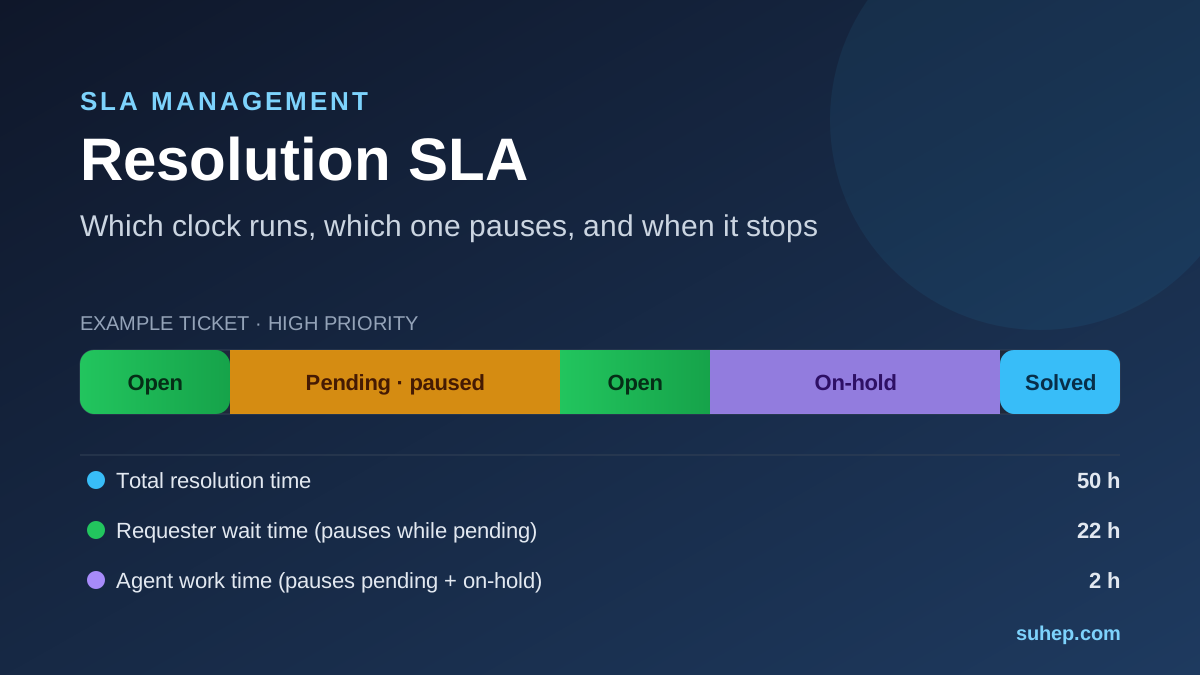
Here is why decision 1 matters. A customer reports a broken invoice download at 10:00 on Monday:
- Monday 10:00 to 11:00: the ticket is open while an agent investigates.
- Monday 11:00 to Tuesday 15:00: the agent asks for the invoice number and sets the ticket to Pending. The customer replies on Tuesday at 15:00, which reopens it.
- Tuesday 15:00 to 16:00: the agent reproduces the problem, confirms a bug and moves the ticket to On-hold while the developers fix it.
- Tuesday 16:00 to Wednesday 12:00: the fix ships and the agent marks the ticket solved at noon on Wednesday.
Counted in calendar time, total resolution time is 50 hours. Requester wait time, which pauses during Pending, is 22 hours. Agent work time, which also pauses during On-hold, is just 2 hours. Same ticket, three honest numbers. If your target is "high priority resolved within 1 business day", whether this ticket breached depends entirely on which clock you chose, and on whether the Pending status was used truthfully.
Before the breach: warnings and escalation
A resolution SLA is only useful if it changes what someone does before the deadline. Freshdesk, for example, can send reminders before SLA targets are due and escalation emails or notifications when a resolution time is violated, and its inbox can sort tickets by their due time. Whatever your tool calls it, set up three things:
- A warning at a fixed share of the target, so the owner still has time to act. Somewhere around three quarters of the target is a common choice.
- A named escalation path: who is told when a ticket breaches, and what they are expected to do (take it over, reassign it, or call the customer).
- An honest update to the customer when the fix will take longer. Freshdesk allows agents to change a ticket's resolution due time after discussing it with the customer; if you allow this, log why, or the SLA quietly becomes whatever the agent wants it to be.
Reporting resolution SLAs
Track, per priority and per month:
- the share of tickets solved within target (see how to calculate SLA compliance rate)
- the median resolution time and the slowest tenth of tickets
- the reopen rate
- the number of tickets currently open past their target
The last one is the number to look at daily. Compliance rate tells you how last month went; open breaches tell you who needs help this morning.
Common mistakes
- One target for every ticket. A how-to question and a payment failure do not deserve the same clock.
- Pausing the clock for internal waits. If On-hold pauses the target, a slow internal team never shows up in the numbers. Pause for the customer, not for yourselves, unless you are deliberately measuring agent effort.
- Targets nobody can see. If the queue does not show time remaining, the SLA is a report, not a tool.
- Never revisiting targets. Review them every quarter, or whenever staffing or ticket volume changes.
Resolution targets in Suhep
In Suhep, each SLA policy is tied to a priority level and sets a first-response target and a resolution target in hours. A Business Hours Only switch decides whether the clock runs only during working hours. The policy form also includes escalation options (notify the assigned agent on breach, notify a manager on breach, auto-reassign on breach) and a warning threshold that defaults to 80% of the target.
You can read how this is configured in the help article on ticket priorities and SLA, see the overview on the SLA management page, or follow a ticket from start to finish in how a ticketing system works.
Sources
Frequently asked questions
What is an SLA for ticket resolution?
It is a target for how long it should take to fully solve a support ticket, usually set separately for each priority level. The clock starts when the ticket is created and stops when it is marked solved, and many teams pause it while they are waiting for the customer to reply.
What is the difference between response time and resolution time SLAs?
A response SLA measures how quickly the customer gets a first reply from a person. A resolution SLA measures how quickly the problem is actually fixed. Teams usually need both, because a fast reply does not guarantee a fast fix.
Should the resolution SLA clock pause while a ticket is pending?
Usually yes, if Pending means you are genuinely waiting for the customer. Pausing for internal waits, such as another team or a supplier, hides delays the customer still feels, so many teams keep the clock running for those.